Google has a knack for coming up with features that you never even realized you need until they exist.
Google Handwrite is one of those features.
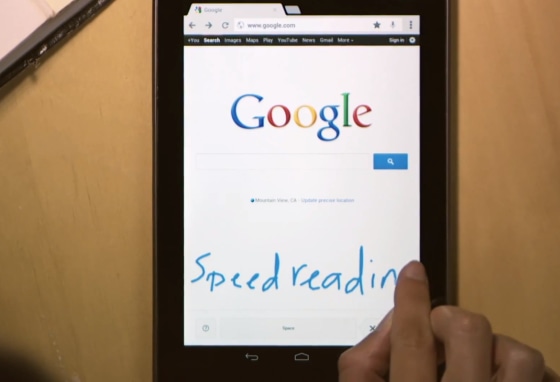
As Google software engineer Rui Ueyama explains on the official Google blog, Handwrite is simply another way to conduct Web searches from your smartphone or tablet. It means that you can now write out search terms with your finger instead of tapping them out the good old-fashioned way. (You can still also search using your voice or an image, of course.)
It sounds like a silly feature at first, but you'll likely fall in love with it after a couple of tries. I most certainly did.
As someone with handwriting so atrocious that I should be a medical professional, I expected that Handwrite would fail to recognize any query I tried. But instead, it flawlessly transcribed three out of every five words, no matter how long or bizarre they were. I tried to trip the feature up by mixing cursive and block letters, but no dice — Handwrite still did pretty well. It even worked like a charm when I wrote with my eyes closed and one of my hands metaphorically tied behind my back.
I have a hunch that once one gets used to writing things out on a mobile device's screen, it could become a faster to search than good ol' typing.
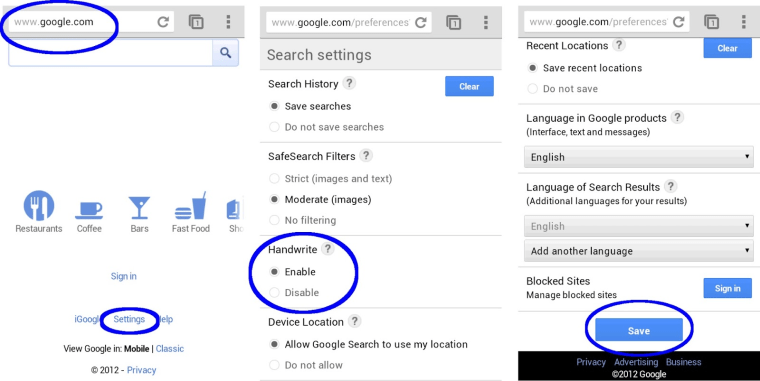
To try Handwrite yourself, you'll need an Apple device running iOS 5 or higher, an Android smartphone running Android 2.3 or higher, or an Android tablet running Android 4.0 or higher. If you've got one of those around, open your browser, go to the Google search page and look for the "Settings" button. There you can enable Handwrite.
Once you've done that, you can just tap the new Handwrite icon any time you want to scrawl out your search query. And don't worry, you can still continue using auto-complete in conjunction with Handwrite. Here's how the two work together:
Want more tech news or interesting links? You'll get plenty of both if you keep up with Rosa Golijan, the writer of this post, by following her on Twitter, subscribing to her Facebook posts, or circling her on Google+.